

You can now search through reviews on the Google Play Store | Infinium-tech
Google recently added a new little feature to the Google Play Store on Android, and it’s a search bar. This may not sound very exciting, but placement matters. This new search bar appears when you go to the reviews section of an app or game, allowing you to quickly search for specific keywords in all the reviews left by other people.
If you’re not sure if an app has a specific feature or how it behaves in a specific scenario, this is definitely a huge improvement in quality of life, saving you the time spent manually sifting through countless reviews to find what you’re looking for.
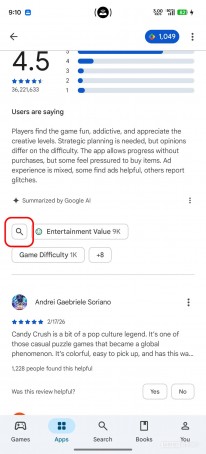
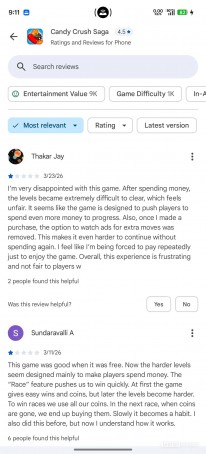
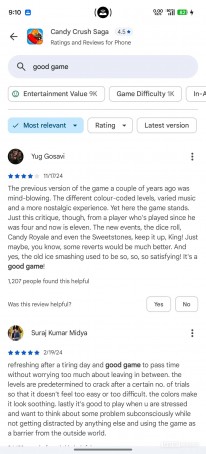
Google Play Store’s new search bar for reviews
This new search bar has been in testing since November, and now it’s becoming fully available to everyone with the recent Play Store update. That said, keep in mind that Google’s software rollouts are extremely slow, so if you haven’t seen it yet, don’t worry — it will arrive on your device at some point too, but that point may be days or weeks away. If you want to help with the process manually, go to the Play Store, tap your profile picture, then go to Settings > About > Update Play Store and make sure you’re on version 50.7.24-31.
To access the search bar, tap the rating at the top of any app, then tap “See all reviews.” Then it will appear at the top. Or you can scroll down to the Reviews and Ratings section, then tap the magnifying glass icon under the AI-generated review summary. This will also have the same effect. Once you enter at least a few words in the search bar, reviews containing those words get listed below. Strange, it has to contain at least two words – if you enter only one it won’t work (we’re not sure if this is a bug or not).
Unfortunately, reviews also don’t populate as you type (at least not in this iteration of the feature), and as we’ve already mentioned, the search only looks for reviews with specific matches to your query. This is a good first step, but it would definitely be useful in the future to have some semantic search support so you don’t have to type in the exact word. However, suggestions are shown below the search bar for popular queries.













Leave a Reply